Release Notes
Release Version 1.5.7 Build Release
Release Date: Apr 11, 2026
New Features
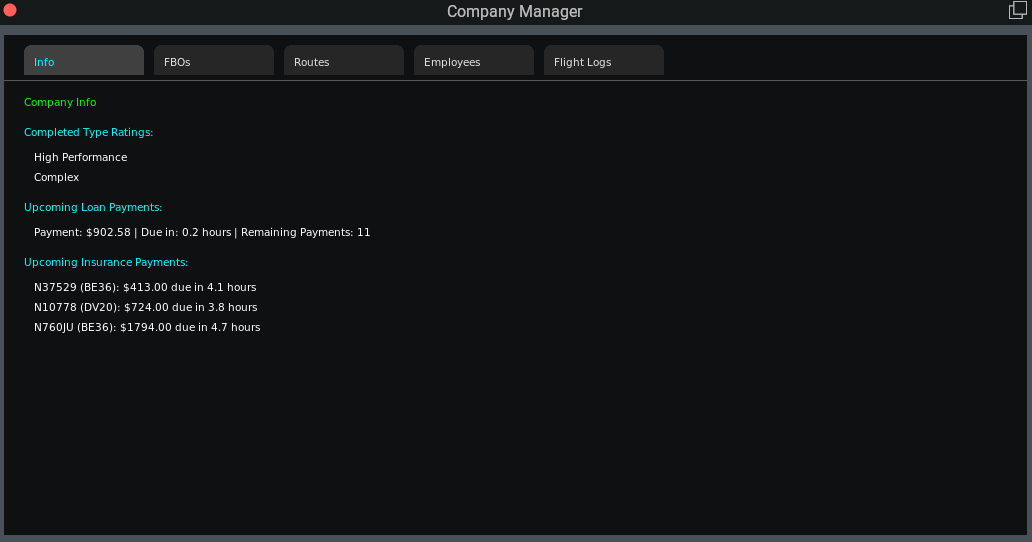
- Company Info Tab: Added a new info tab to the company manager. This will display all type ratings earned as well as upcoming loan and aircraft insurance payments.
Other Updates
- Updated depreciated X-Plane datarefs to new versions.
Release Version 1.5.6 Build Release
Release Date: Apr 8, 2026
New Features
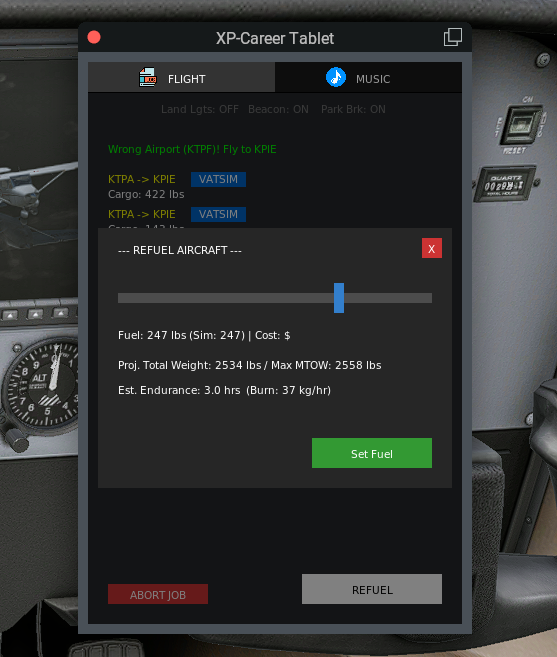
- Refueling Popup: You can now land at any airport en route to your final destination, park, and shutdown, to bring up a refueling window to refuel your aircraft during long trips.
- Load Alert: You will now be visually and audibly alerted if you start to taxi and have not loaded your aircraft at the start of a job.
Other Updates
- The single auto generated cargo job to your original home airport has been removed. Instead, users can use the custom job generator to generate a more complete list of jobs to return to an FBO whenever they want.
Release Version 1.5.5 Hotfix Release
Release Date: Apr 4, 2026
Bug Fixes
- Fixed scenario where user would be unable to switch aircraft at an FBO.
Release Version 1.5.4 Build Release
Release Date: Apr 2, 2026
New Features
- Improved Map Interactions: You can now click anywhere on a job route line in the VFR map to open up the destination aiport add job window. The popup window now also displays an airport diagram of the destination airport.
- New Keybind: You can now set a key bind to show/hide the main XP-Career window.
Bug Fixes
- Potential fix for linux users being unable to paste license keys in the activation window.
- Adjusted destination column width in job list main window to accomodate longer ICAOs.
Release Version 1.5.3 Build Release
Release Date: Mar 29, 2026
New Features
- Selectable Parking: You can now click and hold the New Parking button to bring up an interactive airport diagram to select a specific parking spot.
- VATSIM: You can now file a prefilled flight plan on VATSIM with data from your fms route with the click of a button. Additionally, if you are logged in to xPilot, available ATC controller information will be displayed in the flight tablet.
- Music Player Output: Option to select your audio output for music in the music player.
Bug Fixes
- Fix for instances where audio player ducking could get stuck or music would stop playing during radio transmissions.
Release Version 1.5.2 Build Release
Release Date: Mar 27, 2026
New Features
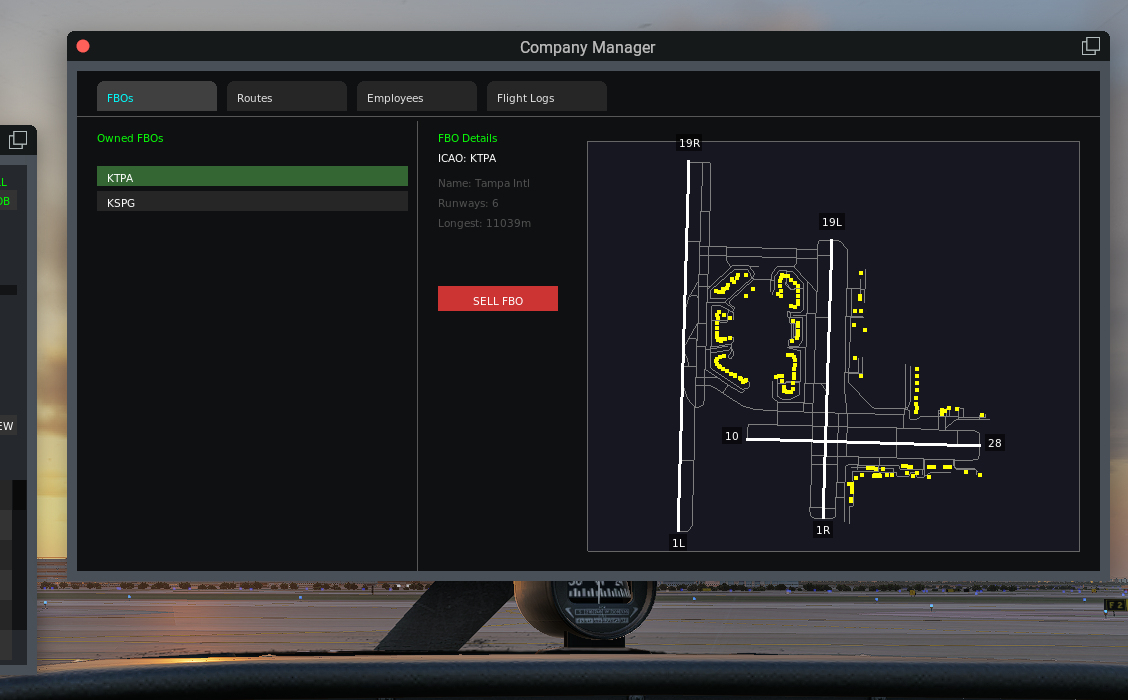
- FBO Airport Diagrams: Airport diagrams are now displayed in the FBO details pane in the company manager.
- xPilot Support: Audio ducking in the music player will now work with xPilot when using VATSIM.
Other Updates
- Profile Login: Users must first login before being able to access secondary windows from the plugin menu.
- Charter Cost Adjustments: Adjusted charter costs for large aircraft/airliners.
Bug Fixes
- Fuel states now save and load properly for charter aircraft and do not save when in freelance mode.
- Fixed typo in code to correct for proper degradation rate when flying owned aircraft and slightly reduced engine degradation base rate for employee flown aircraft.
- Pilot weight set in profile was not being included in payload, this is fixed.
- Filtered out valid parking spots labeled as helipads when flying fixed wing, even though they may actually be set as ramp starts.
- Settings window optimizations and tweaks.
Release Version 1.5.1 Build Release
Release Date: Mar 25, 2026
New Features
- Local Music Player: New music player for you to enjoy during your long cruise legs. Just set it to your folder with your mp3 or wav files and play away. The music player has built in audio ducking to detect any COM traffic and will mute your music during radio communications.
- Smart Parking: Parking assignments upon arrival will now properly detect your aircraft size and assign a gate or parking spot accordingly. Don't like what was assigned? Just press the new parking button to be assigned a new spot.
- CG Balancing: When loading pax or cargo your aircraft CG will now be monitored to keep things safe and balanced.
- Disable Weight and Fuel Setting Option: If you have a separate utility to set your weight and fuel, you can now disable XP-Career from setting your cargo and fuel so it does not interfere. Simply check the disable boxes in the settings window.
Other Updates
- UI Improvements: Added UI tabs to the fleet and company manager windows for a better visual feel.
- Fuel Persistence: Fuel levels will now properly be saved for aircraft.
Bug Fixes
- Properly blocked users from being able to sell or perform maintenance while an aircraft is being used by an employee.
- Minor edge case fix where an aircraft was incorrectly unavailable to assign to an employee.
Release Version 1.5.0 Minor Release
Release Date: Mar 23, 2026
New Features
- THE COMPANY MANAGER UPDATE: Build your aviation empire by hiring AI employees to fly for your company! You can now use the new Company Manager window to expand your operations.
- Employee Management: Review generated pilot profiles, negotiate hiring using company capital, and manage an active roster of AI pilots.
- Fleet Assignments: Hand over the keys! Assign your owned aircraft tail numbers securely to your employees.
- Automated Routes: Dispatch your staff on dedicated routes (capped at 3 employees per route) to continuously generate passive company profit while you fly your own legs.
- Live Tracking: Monitor your employees' live flight progress bars seamlessly from the UI to track incoming revenue.
Other Updates
- UI Improvements: Upgraded the text rendering engine natively switching from basic fonts to dynamic Proportional Fonts across the entire plugin for vastly improved readability. Settings option has also been added to globally increase font size if desired.
- Window Persistence: Window positions and size are now saved to pilot profile settings. Window positions can now be reset when desired in the settings window.
- New Aircraft Prices: New aircraft prices have been revamped to reflect more real-world costs.
Bug Fixes
- SimBrief Global NavData Conflicts: Fixed cases where duplicate waypoints with the same name could cause an incorrect waypoint to be added to a route in the x-plane gps navigation system.
Release Version 1.4.16 Build Release
Release Date: Mar 18, 2026
New Feature
- Custom Job Generator: You can now generate custom cargo/pax/airline jobs to any destination you would like with the new custom job generator window.
Bug Fixes
- Fixed helicopter runway centerline pass/fail during takeoff/landing.
Release Version 1.4.15 Build Release
Release Date: Mar 16, 2026
New Feature
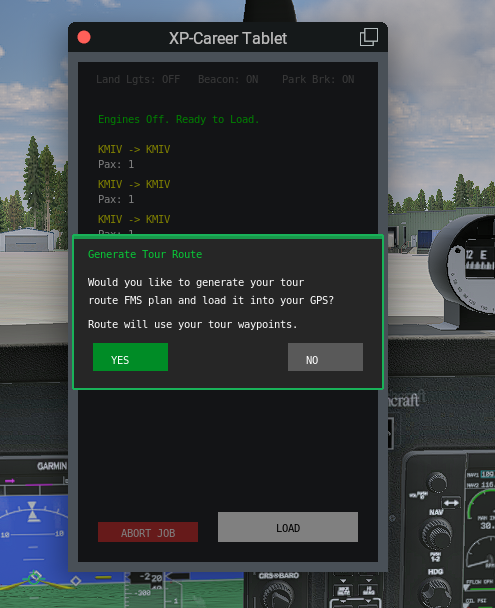
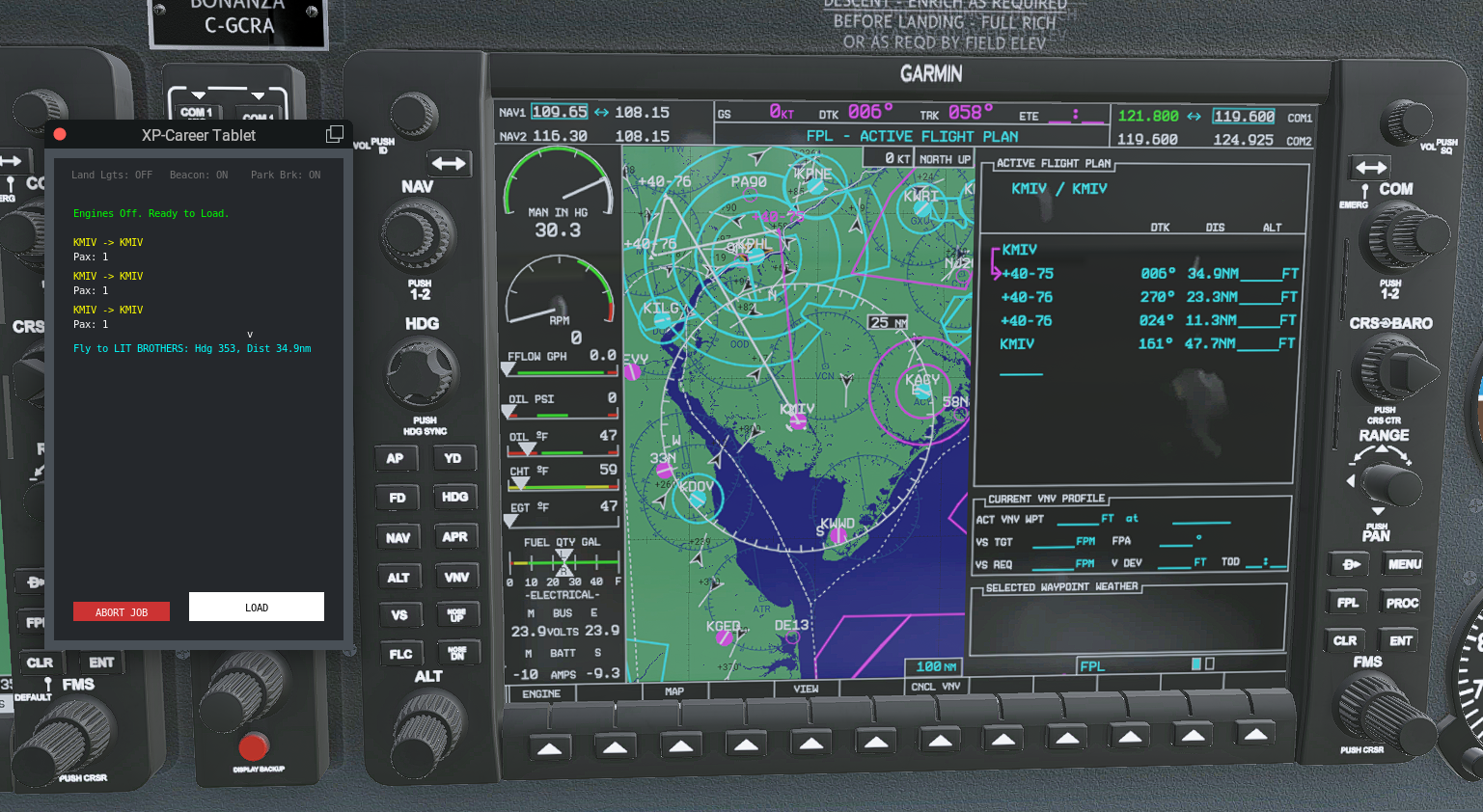
- Sightseeing GPS Routes: You can now generate a sightseeing route for your tour and automatically load it into your GPS (no SimBrief needed).
Other Updates
- Tooltips: Additional tooltips for text buttons in the main window have been added and all tooltips are also displayed in VR.
Bug Fixes
- Fixed incorrect active runway failures in certain scenarios on landing and takeoff.
- Fixed job route lines in map view being drawn from incorrect airports in certain cases (ie. lines should be drawn from N71 but drawn from MN71).
- Fixed broken currency dropdown in general settings.
- Fixed cargo weight value in tablet window always being shown in kg regardless of imperial/metric setting.
Release Version 1.4.14 Build Release
Release Date: Mar 13, 2026
Bug Fixes
- Optimized map view to fix large FPS drop while the VFR Map was open and the XP-Career jobs layer enabled.
- Helipads are now valid load/unload spots for helicopters.
- Fixed parking spot change issues for helicopters at the end of check rides whiling hovering to taxi.
- Helicopters are not permitted to fly banner jobs (TOO HAZARDOUS!)
- Minor adjustments to tablet messages at end of jobs while taxing to parking.
Release Version 1.4.13 Build Release
Release Date: Mar 12, 2026
Bug Fixes
- Fixed pre-flight UI messages in tablet for check rides for clearer user instructions.
- Net pay at end of jobs will now show in red text for negative values.
Release Version 1.4.12 Build Release
Release Date: Mar 9, 2026
New Feature
- SimBrief Support: Job routes in the tablet window can now be click and sent to SimBrief to generate a route. The route can then automatically be loaded into a generic X-Plane 12 GPS system. Route files will also be generated for the Zibo B738 and the RXP GTN system which can be imported and loaded.
Release Version 1.4.10 Build Release
Release Date: Mar 7, 2026
Other Updates
- Pushback Detection: Added a groundspeed monitor while engines are off to detect a pushback and allow for engine startup without failing the parking brake check.
- Aircraft Settings: Added checkboxes to disable/enable beacon and landing lights for aircraft that are not equipped so they will not fail the corresponding safety checks. Also allowed aircraft with only strobes to be detected in place of a rotating beacon like Diamond aircraft.
Bug Fixes
- Fixed UI not showing insufficient funds when trying to start a check ride without enough money.
- Fixed being able to transfer your home base to your current home base.
- Fixed broken load and delete profile buttons when there are 3 or more saved profiles.
Release Version 1.4.9 Build Release
Release Date: Mar 6, 2026
New Features
- Freelance Mode: A freelance mode option is now available to allow pilots the option to run a job from any location in any aircraft they choose.
When running a freelance mode job, base payouts are reduced by 25% and your location and aircraft will not be saved to your career profile upon completion of the job. Freelance mode is not available in hardcore pilot profiles. - Tablet Window Diagnostics: Diagnostic info to verify lights and brake checks are now available at the top of the tablet window. Pilots can turn this info off in their settings if they do not wish to use it.
Release Version 1.4.8 Build Release
Release Date: Mar 4, 2026
Other Updates
- Added confirmation dialog when deleting a profile.
Release Version 1.4.7 Build Release
Release Date: Mar 3, 2026
New Feature
- Range/Endurance Estimates: When adding jobs and setting fuel, flight time and distance estimates are now displayed under the fuel info in the main window.
Other Updates
- Job distance settings have been changed from setting a single average job distance to a min/max distance range for more user flexibility.
- Several UI polish updates across all plugin windows.
Release Version 1.4.5 Build Release
Release Date: Mar 1, 2026
New Feature
- Hardcore Mode: When creating a new profile, you now have the option to select hardcore mode. When selected, you are restriced to $5000 in starting funds and the free starter aircraft is disabled. Job base pay is reduced 50% and you can not take a check ride until the minimum flight hours for the type rating are met.
Other Updates
- Helicopters will no longer fail active runway and centerline checks when taking off from helipads and hovering to taxi.
- Job settings max distance slider increased to 7000nm for long haul jobs.
Release Version 1.4.4 Build Release
Release Date: Feb 26, 2026
New Feature
- Scenic Banner Tows: There are now two versions of banner tow jobs, the current, procedurally generated banner tows and now scenic banner tows. Scenic banner tows
are pre defined tow routes along costal beaches, bays and lakes, or along populated rivers through cities. If you are within 50nm of a scenic banner route you will be given that route, otherwise you will be assigned the procedural banner route.
- Procedural Tow
Fly to the start point, then fly the assigned heading while holding altitude and speed for 5 minutes. - Scenic Tow
Fly to the start point, then fly towards the end point while holding altitude and speed. You may follow the coast or river while working your way to the end point using the heading and distance display as a guide. Once you have reached the end point you will complete a lap and turn around to fly back to the start point. Continue until all assigned laps are completed.
View Banner Tow Routes
- Procedural Tow
- Map Parking Icon: You will now see a parking icon at your assigned parking spot on the VFR map.
Bug Fixes
- Fixed missing taxi guidance arrows at some airport due to incomplete taxi networks.
- Fixed free insurance loophole when purchasing insurance on an aircraft acquired with the free starter aircraft voucher.
- Added heading info to the next POI during sightseeing jobs.
Release Version 1.4.0 Minor Release
Release Date: Feb 22, 2026
New Feature
- THE AIRSHOW UPDATE: Show off your aerobatic skills and get graded for your precision while you perform from a list of 14 different tracked maneuvers for the crowd below! Check the manual for descriptions on how to perform each maneuver!
Bug Fixes
- Fixed missing persistent cargo job back to home airport.
- Fix missing intel based mac support for mac plugin builds.
Release Version 1.3.6 Build Release
Release Date: Feb 19, 2026
Bug Fixes
- Fixed FMS dataref integration and initialization when changing between different aircraft in airline jobs.
- Added missing parking enforcement and taxi guidance to check rides after landing.
- Fixed incorrect LIT texture in poi obj marker.
Release Version 1.3.5 Build Release
Release Date: Feb 18, 2026
New Feature
- Skunkcrafts Updater Integration: XP-Career will now update with the Skunkcrafts Updater utility.
Bug Fixes
- Economy Balancing: Adjustments for large aircraft cargo jobs and proper charter cost rate scaling across all aircraft.
- Safety Checks: Parking brake check fix for some custom aircraft and beacon light check fix for the A320.
- Sightseeing Landmarks: Fixed a case sensitivity bug that prevented landmark locations from being loaded from the points of interest data files.
Release Version 1.3.4 Build Release
Release Date: Feb 15, 2026
New Feature
- Persistent Home Cargo Job: You will now always have a cargo job available to your home airport when you are away at another destination.
Bug Fixes
- Cleaned up plugin initialization and shutdown code.
Release Version 1.3.3 Build Release
Release Date: Feb 13, 2026
UI Improvements
- Aircraft Settings Window: You can now edit max seat numbers of your installed aircraft in the aircraft settings window.
Bug Fixes
- Fixed banner job banner run timer running too fast.
Release Version 1.3.2 Build Release
Release Date: Feb 12, 2026
New Features
- Taxi Guidance and Parking Enforcement: Upon completion of a job and arrival at the destination airport pilots will be assigned a parking spot. Progressive taxi arrows will be spawned to direct pilots to the highlighted parking spot. The progressive taxi display can be turned of in general settings. Pilots will also be required to start an a valid ramp spot to load their aircraft at the start of a job.
UI Improvements
- Aircraft Config Button and Popup: The aircraft config button to set the number of seats in an aircraft will no longer display over the "take check ride" button if the user has not configured the seats and also not taken a check ride with the loaded aircraft. Once the aircraft is configured then the check ride button will display. Users can now manually type the number of seats in the aircraft config popup in addition to using the +/- buttons.
Bug Fixes
- Cleaned up flight state transitions in the tablet window to account for events such as bounces on take off, premature engine cutoff during taxi or flight, or landing before completion of a job.
Release Version 1.3.1 Build Release
Release Date: Feb 9, 2026
New Features
- Home Airport Transfer: You now have the option to transfer your home airport to your current location. Transfer cost is based on the number of runways and longest runway at the airport.
UI Improvements
- Confirmation Popups: Confirmation popups such as buying/selling aircraft and buying/canceling insurance now have adjusted opacity for better readability.
Bug Fixes
- Fuel Slider: Fuel slider now properly respects the max fuel allowed per internal fuel tanks. Current simulator fuel amount is now properly shown under the slider.
- Map Job Popups: Map job destination popups will now properly display after completing a job and trying to immediately open the map and click on a new destination.
Release Version 1.3.0 Minor Release
Release Date: Feb 8, 2026
New Features
- Airline Operations: Introduction of high-fidelity Airline Contracts for aircraft with >19 seats. Includes dynamic pay scaling based on seat capacity and strict Standard Operating Procedure (SOP) monitoring (Bank Angle, G-Force, Speed, Lights).
- Jetway Automation: Automated Ground Handling! Jetways now automatically dock when you open the flight tablet and undock 3 seconds after loading is complete. Supports Native XP12 and OpenSAM systems.
UI Improvements
- Market Timer: Added a visual countdown timer indicating when the Used Aircraft Market will refresh.
- Map Labels: Airline jobs are now clearly distinct on the map with "AIR" labels.
- Forecast Window: Moved the window title to the decoration bar for a cleaner look.
Bug Fixes
- VR Fixes: Fixed an issue where the Fleet Manager window would not appear in VR.
Release Version 1.2.2 Build Release
Release Date: Feb 4, 2026
New Features
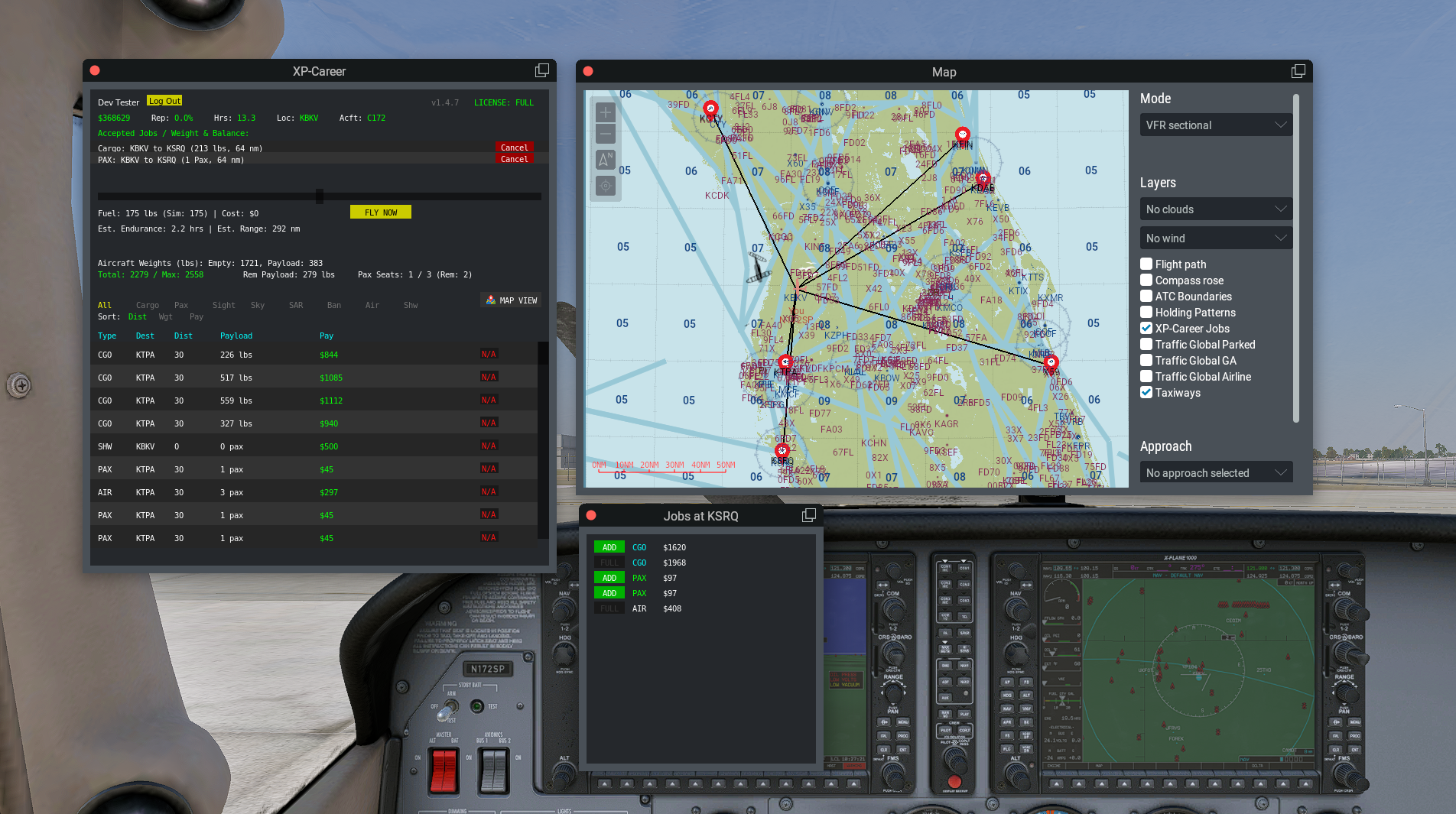
- Jobs Map View: You can now open the X-Plane VFR Map to view the XP-Career Jobs layer to view all available job routes from your location. You can also click on a destination (2D mode only) to view and add jobs at that destination.
UI Improvements
- Improvements to the aircraft settings enable/disable scroll list.
Bug Fixes
- Aircraft acf scanning now supports aircraft installed using symbolic links on windows.
- Improved apt.dat parsing to make sure we are pulling proper FAA ICAO airport codes and not X-Plane internal ICAO codes for some airports.
Release Version 1.2.0 Minor Release
Release Date: Feb 3, 2026
New Features
- Check Ride System: Introduces a comprehensive evaluation mode including flight maneuvers (Heading/Altitude hold), and precision landing scoring. The more flight hours you build the cheaper the check ride fee will be.
- Insurance System: Added owned aircraft insurance functionality. Pilots can now purchase insurance policies for their fleet to protect against crash costs. Aircraft condition categories must be at 50% or above to purchase a new insurance policy. Insurance is billed every 5 flight hours.
- Banner Towing Mission Updates: Banner run phase is now time based (5 minutes) with quality checks for speed, altitude, and bank angle.
- Fleet Manager: Added confirmation dialogs for all fleet transactions (Buying New/Used and Selling) to prevent accidental purchases.
- Calm Wind Logic: Improved 'Active Runway' detection. The system now recognizes 'Calm Wind' (< 5 kts) conditions, allowing takeoff/landing from any runway rather than enforcing strict wind direction alignment.
- Starter Aircraft: You now have the option to start with a free aircraft when creating a new profile. Redeem your 'free aircraft voucher' in the Fleet Manager new aircraft list.
UI Improvements
- Added standard Unit Toggle (kg/lbs) for pilot weight in new profile creation.
- Improved scrollbar visual behavior in the main dashboard job list.
Bug Fixes
- VR Experience: Fixed windows switching to 2D when reloading aircraft.
- Simulation Clock Speed: Fixed a critical bug where the internal simulation (loading, mission timers, fuel burn) was running at 2x speed due to a duplicate update loop. All timers now match real-time.
Release Version 1.1.2 Hotfix Release
Release Date: Feb 1, 2026
Bug Fixes
- Mac/Linux Platform Fixes: Additional fixes for Mac/Linux platform with data read/write issues.
- Bugfix: Unable to unload cargo to finish a job if an engine shutoff/startup was detected after landing and before unload.
Release Version 1.1.0 Minor Release
Release Date: Jan 30, 2026
Features Updated
- Banner Towing: Banner towing jobs have been added! Take off from the airport, look for blue smoke to identify your pick up location to fly in and hook the banner. Next you will head to the start point of your banner run. After completing your run, head back to the airport to drop off the banner and land. Banner Tow Preview
- UI and Sounds: New loading/unloading sounds and ui messages appropriate for specific job types.
Bug Fix
- Mac/Linux License Activation Window: The paste button functionality should now work in the license activation window.
Other Notes
- Release version number has been added to the main window.
Release Version 1.0.1 Hotfix Release
Release Date: Jan 28, 2026
Features Updated
- License System: Fixes and improvements to licensing system.
Features Added
- Banner Tow Jobs: Initial implementation of banner tow jobs. Still in development so you may encounter bugs.
Release Version 1.0 Initial Release
Release Date: Jan 26, 2026
We are proud to present the first public release of XP-Career!
Features Included
- Complete Career Mode: Progress from Piston singles to Multi-Engine Jets.
- Dynamic Job Generator: Cargo, Passenger, Skydiving, Sightseeing, and Search & Rescue missions.
- Used Aircraft Market: Buy, sell, and finance aircraft with bank loans.
- Flight Analysis: Real-time grading of landings and flight safety.
- Smart Integration: Automatic startup scanning of installed aircraft with parsing for Engine Type, Horsepower, and Capacity.
- Persistent Profiles: Track your hours, rank, and finances over time.